ekklesiaandClaude Opus 5.5
1cb9fd35d2
ekklesiaandClaude Opus 5.5
1cb9fd35d2
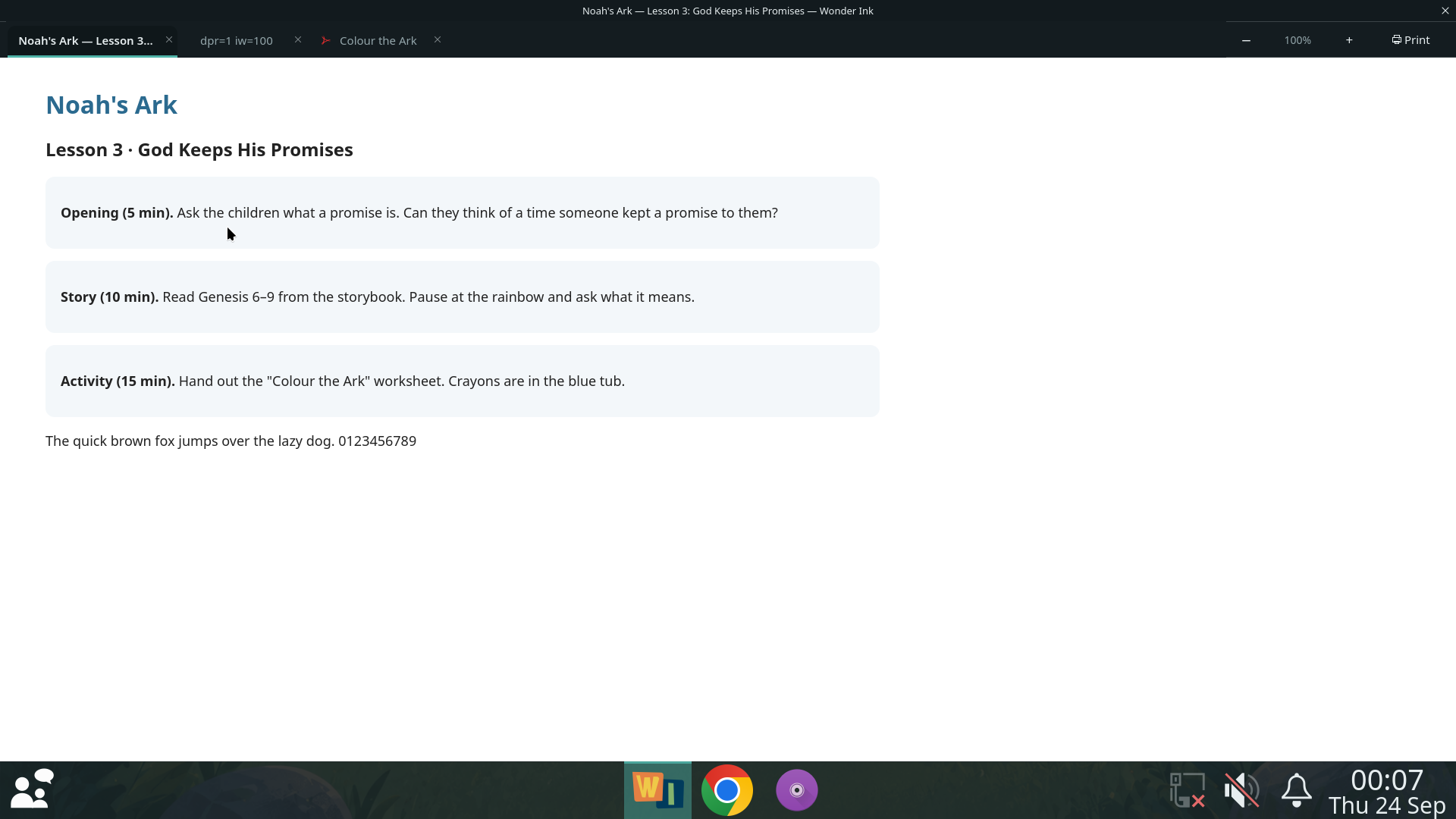
The tab strip is drawn from the classroom's own palette, the one the
panel, Parent Call and Presentations read: larger titles, an accent
under the active tab, worksheets marked with a document icon. Its one
corner widget is the lesson's size and Print — not a new-tab button. With
one tab the strip stays hidden, as before; a change of size shows a
moment's badge instead, and the right-click menu and keys still work.
The window is named "Lesson — Wonder Ink" and carries its own icon.

The print preview showed "Page 1 could not be shown" in the real
session while printing correctly: poppler 25.03 does not write to stdout
when asked for "-" — it writes a file called "-.png" into the current
directory, which for Wonder Ink is the teacher's home. Pages are now
rendered into a directory of their own, and the lab print check fails
any preview that does not draw its page.

The teacher's manual has lesson size and printing.

Co-Authored-By: Claude Opus 5.5 <[email protected]>
168 KiB
1920x1080px
168 KiB
1920x1080px